
3.Cơ chế xác thực (JWT/Bearer)
3.1. Mục tiêuTiêu chương
Chương
Chương này quy định chuẩn codingxác thực và nguyên tắc thiết kế bảo mật nhằm:
Đảm bảo
codecơ chế xác thực thống nhất giữa cácmoduleintegration flow vàcácđơn vị phát triểnGiúp
codeartifact dễ đọc, dễ hiểu và dễ bảo trìGiảm lỗi phát sinh do
cáchxửđặtlýtên hoặc codingtoken khôngđồngđúngnhấtTăng hiệu quả review và kiểm soát chất lượng
codeĐảm bảo
→codetoàntuânbộthủluồngnguyêntừlýClientthiết→kếAPIMSOLIDMI - →
ĐảmBackendbảođềukiếncótrúcxácbackend Spring Bootthực nhất quán - Tích
hệhợpthốngđúng với WSO2 Identity Server (IS) làm trung tâm cấp và xác thực token
3.2. Khái niệmNiệm / phạmPhạm viVi ápÁp dụng
Dụng
Quy định này áp dụng cho:
Toàn bộ
chuyển tiếp request qua xác thựcsourceartifactcodexửcủalýhệhoặcthốngCore Team và Partner Team
Tất cả các
moduleAPI, Sequence, Inbound Endpoint trongmodules/artifacts/**- Cấu
Cáchìnhthành phần trongcommon/**config/** Tất cả service, controller, repository, DTO, entity
Kiến Trúc Xác Thực Tổng Thể
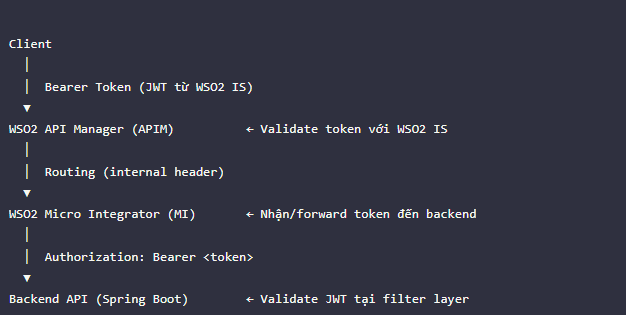
Ba Tầng Xác Thực
| Tầng | Thành phần | Vai trò xác thực |
|---|---|---|
| Cấp token | WSO2 Identity Server (IS) | OAuth2 Authorization Server, cấp JWT/Access Token |
| Validate token | WSO2 API Manager (APIM) | Xác thực token tại Gateway trước khi route vào MI |
| Forward token | WSO2 Micro Integrator (MI) | Set Authorization: Bearer header khi gọi backend |
3.3. Quy địnhĐịnh chínhChính
3.3.1. Quy tắcTắc đặtĐặt tên
Tên Artifact
Các thànhartifact phầnliên quan xác thực phải đặt tên theo quy ước thống nhất:
| Thành phần | Quy tắc đặt tên | Ví dụ |
|---|---|---|
<Name> |
|
|
<flow>-inboundSequence.xml |
|
|
| Error Sequence | <flow>-inboundErrorSequence.xml |
|
| Inbound Endpoint | <flow>.xml |
|
| Connection Entry | <Name> |
|
<Name> |
| |
| | |
| | |
| | |
| | |
| |
3.3.2. Quy tắcTắc chungĐặt Java
Property Trong Sequence
Dùng camelCasetên cho:property nhất quán khi xử lý token/header:
<!-- Đúng: Biến
Tên property rõ Method
Dùng PascalCase cho:
Class
Interface
Enum
Ví dụ:
3.3.3. Quy địnhĐịnh vềVề logging
Logging Xác Thực
Không được dùng:bỏ qua bước log khi xử lý request:
Phải dùnglog loggingđầy chuẩn:đủ các bước:
3.3.4. ValidationQuy dữĐịnh liệuVề đầuToken vào
/ Header Xác Thực
TấtToken cảdùng dữđể liệugọi đầu vàobackend phải được validateset bằngtừ annotation.local-entries hoặc config.properties — không hardcode trong Sequence:
Annotation
<!-- chuẩn:SAI: Hardcode - token
@NotNull
trong Sequence - -->
@NotBlank
<header name="Authorization" - scope="transport"
@Size
value="Bearer
@Email
@Pattern
Ví dụ:
<!--
ĐÚNG: Lấy token từ property/config -->
<property name="BACKEND_TOKEN"
expression="get-property('conf:backend.auth.token')"
scope="default"/>
<header name="Authorization" scope="transport"
expression="fn:concat('Bearer ', get-property('BACKEND_TOKEN'))"/>
3.4. Nguyên Lý Tách Biệt Trách Nhiệm (Separation of Concerns)
Tương đương nguyên lý thiết kế SOLID áp dụng trong dựhệ ánthống
WSO2:
3.4.1. S — SingleMỗi Responsibility
Artifact Một Trách Nhiệm
MộtMỗi classartifact chỉ cóđược thực hiện một tráchnhiệm nhiệm.vụ:
Artifact
Chỉ được làm
apis/Nhận HTTP request, set header auth, gọi backend/Kafka, trả response
sequences/*-inboundSequence.xmlĐiều phối luồng message từ Kafka đến backend
sequences/*-inboundErrorSequence.xmlGhi nhận lỗi và publish vào error_topic
inbound-endpoints/Kết nối Kafka, subscribe topic
local-entries/Lưu thông tin kết nối và cấu hình dùng chung
QuySai định— dựError án:logic nằm trong inbound sequence:
<!-- SAI: ControllerInbound →sequence chỉtự xử lý HTTPlỗi kỹ thuật -->
<sequence name="myFlow-inboundSequence">
<call>...</call>
<property name="ERROR_CODE" expression="get-property('ERROR_CODE')"/>
<kafkaTransport.publishMessages configKey="KafkaConnection">
<topic>error_topic</topic>
</kafkaTransport.publishMessages>
<!-- Đây là nhiệm vụ của inboundErrorSequence -->
</sequence>
Đúng — Error sequence riêng biệt:
<inboundEndpoint
sequence="myFlow-inboundSequence"
Service → xử lý nghiệp vụ
Repository → truy cập DB
Mapper → convert DTO ↔ Entity
Sai:
Đúng:
3.4.2. O — Open/Closed
Mở Rộng Không Sửa Artifact Cũ
CodeKhi phảithêm mởtopic/luồng rộngmới, đượctạo nhưngartifact mới — không sửa codesequence cũ.của luồng khác:
Áp
<!-- dụng:Thêm luồng - mới:
Dùngtạo interfacefile Service
riêng -->
- <!--
Khôngplanning_topic-inboundSequence.xml sửa-->
class<!-- gốcplanning_topic-inboundErrorSequence.xml khi-->
thêm<!-- logic
planning_topic.xml (inbound
endpoint) Ví dụ:
Triển khai:
3.4.3. L — LiskovConsumer Substitution
Tuân Thủ Contract Sequence
ClassInbound con có thể thay thế class cha.
Quy định:
ServiceImplEndpoint phải tuântrỏ interfaceđúng sequence và error sequence đã khai báo:
<!-- Sai: KhôngonError throwtrỏ exceptionsai mớisequence trái-->
contract
<inboundEndpoint name="Load_balance_example"
sequence="Load_balance_example-inboundSequence"
Sai:
onError="someOtherSequence"/> <!--
Đúng -->
<inboundEndpoint name="Load_balance_example"
sequence="Load_balance_example-inboundSequence"
onError="Load_balance_example-inboundErrorSequence"/>
3.4.4. I — InterfaceTách SegregationRiêng Local Entry Theo Chức Năng
Không tạonhét interfacetất quácả lớn.cấu hình vào một local entry:
<!-- Sai: Một local entry chứa tất cả -->
<localEntry key="AllConfig">
<!-- Kafka config, backend URL, token, ... -->
</localEntry>
<!-- Đúng: Tách riêng -->
<localEntry key="KafkaConnection">...</localEntry>
<localEntry key="BackendConfig">...</localEntry>
Sai:
Đúng:
3.4.5. D — DependencyPhụ Inversion
Thuộc Config, Không Hardcode
Phụ thuộc abstraction, khôngSequence phụ thuộc implementation.vào local-entries và config.properties — không hardcode URL hay token:
Quy
<!-- định:Sai -->
- <address
Injecturi="http://192.168.0.133:8080/api/v1/plannings"/>
interface
<!-- Đúng - -->
Không<address new service
Sai:
Đúng:
3.5. QuyLuồng tắcXác kiếnThực trúcChuẩn SpringTrong BootHệ trongThống
dự án
3.5.1. Luồng chuẩnChuẩn tầng
Từ validate Khôngtoken được:
với
3.5.2. ControllerLuồng Kafka Consumer Không Đi Qua APIM
Kafka Topic (test_topic_01)
→ [1] MI Inbound Endpoint consume message
→ [2] MI Inbound Sequence xử lý
→ [3] MI set header Authorization: Bearer <token>
→ [4] MI gọi Backend API
→ [5] Backend validate JWT
→ [6] Kết quả: published_topic hoặc error_topic
Luồng Kafka consumer bypass APIM Gateway — token phải được quản lý thủ công trong MI (lấy từ IS hoặc dùng service account token).
3.5.3. Không Được Phép
<!-- Sai: Gọi backend không chứacó nghiệpAuthorization vụheader -->
<call>
<endpoint>
<address uri="http://192.168.0.133:8080/api/v1/plannings"/>
</endpoint>
</call>
<!-- Sai: API tại APIM không bật Security Scheme -->
<!-- Mọi API publish lên APIM đều phải bật OAuth2 hoặc API Key -->
3.5.4. Luồng Token Trong Kafka Consumer (Chuẩn)
<!-- Bước 1: Lấy token từ config -->
<property name="BACKEND_TOKEN"
expression="get-property('conf:backend.auth.token')"
scope="default"/>
<!-- Bước 2: Set Authorization header -->
<header name="Authorization" scope="transport"
expression="fn:concat('Bearer ', get-property('BACKEND_TOKEN'))"/>
<property name="Content-Type" value="application/json" scope="transport"/>
<!-- Bước 3: Gọi backend -->
<call>
<endpoint>
<address uri="{$ctx:backend.planning.url}">
<suspendOnFailure>
<initialDuration>1000</initialDuration>
<progressionFactor>2.0</progressionFactor>
<maximumDuration>60000</maximumDuration>
</suspendOnFailure>
</address>
</endpoint>
</call>
3.6. Cấu Hình Xác Thực WSO2 APIM & IS
3.6.1. WSO2 IS — Key Manager
Sai:WSO2 IS đóng vai trò Key Manager cho APIM:
3.7. Cách Thực Hiện / Quy Trình
Quy Trình Thêm Xác Thực Cho Luồng Mới
Đúng:
Bước
3.5.3. Service không chứa logic HTTP
Sai:
Đúng:
3.5.4. Repository chỉ truy vấn dữ liệu
Không chứa:IS
- Tạo
validation
Service Provider
- Lấy
businessclientId logic
và
mapping
clientSecret
Bước 3.6.2:
DesignCấu patternhình sử dụngtoken trong hệ
thốngbackend.auth.token=<access_token_từ_IS>
3.6.1.backend.planning.url=http://192.168.0.133:8080/api/v1/plannings
Service pattern
ServiceBước là3: tầngTrong nghiệpSequence, vụđọc trungtoken tâm.từ config
3.6.2. DTO pattern
Tách DTO khỏi Entity.
Không trả Entity ra API.
Sai:
Đúng:
3.6.3. Mapper pattern
Convert DTO ↔ Entity.
3.6.4. Exception pattern
Dùng BusinessException thống nhất.
3.7. Cách thực hiện / quy trình
Quy trình tạo DTO đúng chuẩn
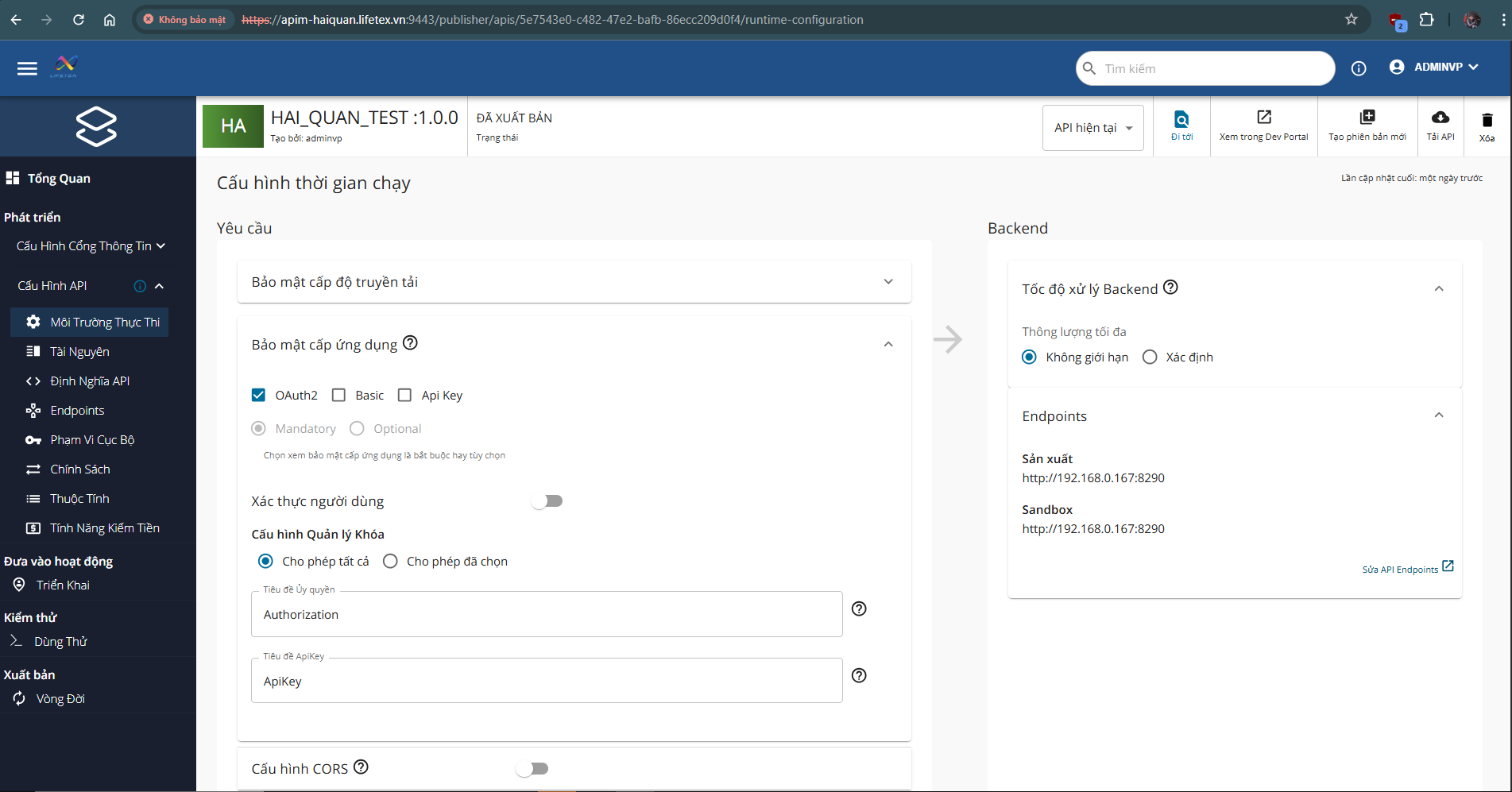
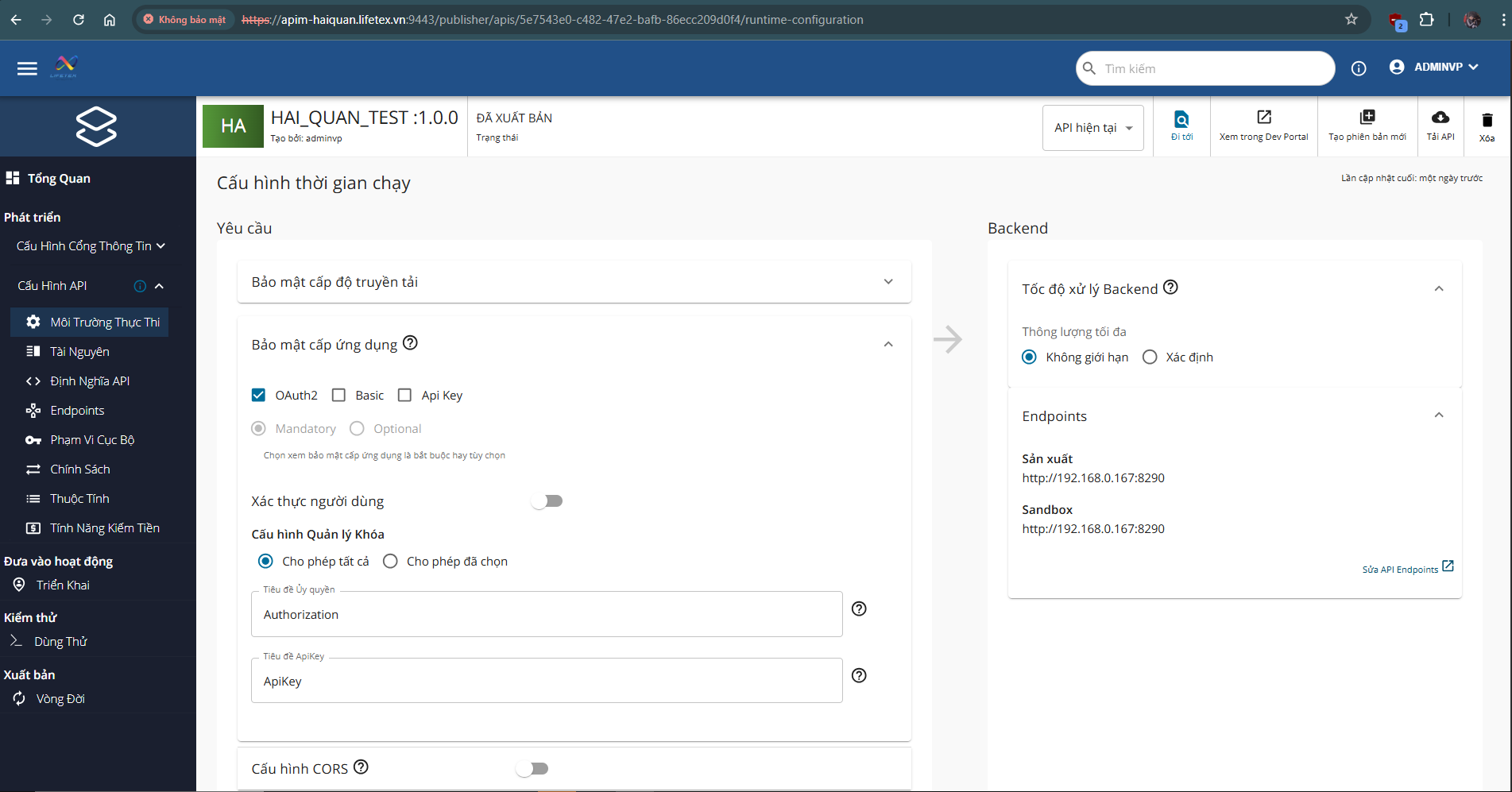
Bước 1:4: TạoPublish classAPI DTOlên theoAPIM quyvới tắcOAuth2 đặt tên
Ví dụ:Security
- Import
UserCreateRequest
OpenAPI spec từ resources/api-definitions/
- Enable
UserUpdateRequest
Security: OAuth2
- Set
UserResponse
Key Manager: WSO2 IS
Bước 2:5: ThêmTest validationluồng annotationxác thực end-to-end
Bước
3:- Lấy
Dùngtoken DTOtừ IS
- Gọi API qua APIM với Bearer token
- Verify log trong
controllerMI: STATUS, HTTP_STATUS, PAYLOAD
Quy trình logging chuẩn
Bước 1: Khai báo logger trong class
Bước 2: Dùng logger thay cho System.out.println
3.8. Ví dụDụ minhMinh họaHọa
Ví Dụ Sai — Sequence Không Có Authorization Header
Trường<sequence hợpname="myFlow-inboundSequence">
sai
<call>
Sai vì:
Ví TrườngDụ hợpSai đúng
—
Ví dụ DTO sai
Sai vì:
- Token
Tênhardcode classsẽ khônghết chuẩn
hạn, phải sửa code mỗi lần
- Lộ
Khôngthông cótin validation
xác thực trong source code
- Không
Fieldthể public
thay
Khôngđổi theo DTOmôi pattern
trường (dev / staging / prod)
Ví dụDụ DTOĐúng đúng
—
3.9. Checklist ápÁp dụng
Dụng
Trước khi commit hoặc tạo PR:
Naming
-
API Controller →artifact: *Controller<Name>Api.xml
-
Inbound Service →Sequence: *Service<flow>-inboundSequence.xml
-
Error Repository →Sequence: *Repository<flow>-inboundErrorSequence.xml
-
Connection Entity →Entry: *Entity<Name>Connection.xml
DTO → *Request / *Response
Token Coding
& Xác Thực
-
Không Biếnhardcode vàBearer methodtoken dùngtrong camelCase
Sequence
-
Token Classlấy dùngtừ PascalCase
config.properties hoặc local-entries
-
Mọi Khônglời dùnggọi System.out.println
backend đều có Authorization: Bearer header
-
API publish lên APIM đã bật OAuth2 Security
-
DùngKey loggingManager chuẩntrỏ slf4jđúng về WSO2 IS
Validation
Logging
-
Sequence DTOlog cóSTATUS, validationPAYLOAD annotation
khi nhận request
- Sequence log
HTTP_STATUS, API_RESPONSE sau khi gọi backend
- Error Sequence log
ERROR_CODE, ERROR_MESSAGE, ORIGINAL_PAYLOAD
Separation of Concerns
- API Layer không chứa logic điều phối phức tạp
- Error handling nằm trong Error Sequence riêng
- Kết nối Kafka trong
local-entries, không khai báo lại trong Sequence
- URL backend lấy từ config, không hardcode
Architecture
- Inbound Endpoint trỏ đúng
sequence và onError
- Luồng thành công publish vào
processed_topic
- Luồng lỗi publish vào
error_topic
- Không có
fieldluồng publicnào trongbỏ DTOqua xác thực với backend
SOLID
Controller không chứa nghiệp vụ
Service không chứa HTTP logic
Repository chỉ truy vấn DB
Inject interface, không new
Class có 1 trách nhiệm
Architecture
Không Controller → Repository
Không trả Entity ra API
Có DTO mapping
Exception dùng chuẩn hệ thống
3.10. Cấu trúcTrúc chuẩnChuẩn củaCủa mộtMột hàmSequence xửXử lýLý nghiệpNghiệp vụ
Vụ
3.10.1. Mục tiêu
Tiêu
Quy định cấu trúc thống nhất của một hàm xử lý nghiệp vụinboundSequence nhằm:
Dễ đọc và dễ review
Tách rõrõ: validatenhận –dữ logicliệu –→ logxác –thực exception
→ gọi backend → phân loại kết quả
Tránh thiếu validatelog hoặc thiếu log
xử lý HTTP status
Chuẩn hóa xửcách lýpublish lỗikết vàquả response
vào
Giúp dev mới đọc code hiểu ngay luồng xử lý
topic
3.10.2. Cấu trúcTrúc chuẩnBắt bắt buộc
Buộc
Một hàm service/controllerinboundSequence phải theo thứ tự:
3.10.3. Quy địnhĐịnh chiChi tiếtTiết từngTừng phần
Bước
1. ValidateLưu payload:
<property name="PAYLOAD" expression="json-eval($)" scope="default"/>
Validate annotation ở DTO
Validate nghiệp vụ ở service
Ví dụ:
2. Log
input:
<log level="custom">
<property name="STATUS" value="[KafkaConsumer] Message nhận được từ Kafka"/>
<property name="PAYLOAD" expression="get-property('PAYLOAD')"/>
</log>
Phải log:
input chính
hành động nghiệp vụ
lỗi
3. BusinessSet logic
header Chỉxác chứathực xử(từ lý nghiệp vụ:
mapping
tính toán
gọi repository
gọi service khác
4. Exception handling
Không catch Exception chung chung nếuconfig, không xửhardcode):
lý.<property name="BACKEND_TOKEN"
expression="get-property('conf:backend.auth.token')"/>
<header name="Authorization" scope="transport"
expression="fn:concat('Bearer ', get-property('BACKEND_TOKEN'))"/>
Sai:4. Gọi backend:
Đúng:
5. Response
Service:
- Phân loại kết quả:
7.
<filter xpath="get-property('HTTP_STATUS') = '200' or get-property('HTTP_STATUS') = '201'">
<then>
<!-- publish processed_topic -->
</then>
<else>
<filter xpath="get-property('HTTP_STATUS') >= '400' and get-property('HTTP_STATUS') < '500'">
<then>
<!-- 4xx: lỗi dữ liệu → error_topic -->
</then>
<else>
<!-- 5xx: lỗi backend → error_topic -->
</else>
</filter>
</else>
</filter>trả DTO
hoặc throw BusinessException
Controller:
trả ApiResponse
Controller:
3.10.4. Ví dụDụ hàmSequence sai
Sai vì: Không có Bearer token, không log, không phân loại HTTP status, không publish kết quả.
Không validateKhông logTrả entityKhông xử lý lỗiKhông theo DTO pattern
3.10.5. VíChecklist dụReview hàm đúng chuẩn dự án
3.10.6. Checklist
Sequence
Khi review hàmmột service/controller:inboundSequence:
-
vào property trước khi xử lývalidatelưunghiệpPAYLOADvụ Có log
tin nhận messageinputthôngchính-
Có set
Authorization: Bearerheader (từ config, không hardcode) - Có log HTTP status sau khi gọi backend
- Có phân loại HTTP status: 2xx / 4xx / 5xx
- 2xx →
processed_topic - 4xx và 5xx →
error_topic - Không xử lý
logiclỗi kỹ thuật trongcontrollersequence này - (để
cho
KhôngErrortrả Entity Throw BusinessException đúng chuẩnKhông catch Exception vô nghĩaTrả DTO / ApiResponse đúng chuẩn
Tài liệu này thuộc phạm vi quản lý của Core Team — mọi thay đổi phải được Core Team phê duyệt.